

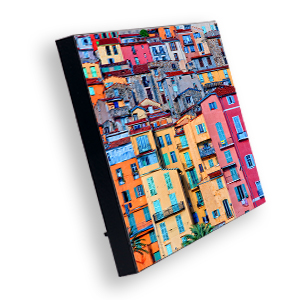


Chromaluxe 4722 Gloss White Photo Panel with Kickstand — 5" × 7"
Photo Panel with Kickstand. 5 × 7 in, Gloss White mdf sublimation blank for indoor personalization.
Share :
Print photographs and artwork directly onto the ChromaLuxe 4722 mdf panel. Its gloss white coating provides a finished image surface for an indoor display without inserting a separate paper print.
Key Features
- Gloss White sublimation-coated face.
- MDF substrate.
- Overall format: 5 × 7 in.
- Designed for indoor photo display.
Applications
Indoor photo décor, family portraits, commemorative designs and business display artwork.
Technical Specifications
| Brand | Chromaluxe |
| SKU | US 4722 |
| Product | Photo Panel with Kickstand |
| Material | MDF |
| Finish | Gloss White |
| Dimensions | 5 × 7 in |
| Thickness | 0.625 in |
| Decoration process | Dye sublimation |
What’s Included
Unprinted photo panel with kickstand.
How to Personalize
Manufacturer starting settings: 385°F / 195°C for 80–100 seconds. Confirm pressure with your press instructions and test before production.
- Prepare mirrored artwork to the matching product template, keeping important details clear of cutouts and edges.
- Remove any protective film and clean the printable face with a lint-free cloth.
- Align the transfer against the coated face and secure with heat tape on the back; avoid applying tape to a decorative edge.
- Place the blank face up with the transfer above it and clean protective paper below and above the work.
- Remove the hot blank with heat-resistant gloves, remove the transfer and allow the product to cool before assembly.
How-To Video
How to Sublimate ChromaLuxe MDF Photo Panels — official Unisub tutorial.
Download Template
Download US 4722 Template Here
Care and Support
Display indoors. Wipe gently with a soft cloth, avoid soaking or abrasive cleaners, and keep wood-based edges dry. Contact Valuerite with the SKU for production support.
Downloads
- Manufacturer printing guidance
- Unisub and small-format ChromaLuxe settings (PDF)
- Manufacturer product catalogue (PDF)
Source: existing Valuerite item details and manufacturer product catalogue. Printing ranges are manufacturer starting guidance for the stated material and format.